Google Ads, previously known as Google AdWords, brings a range of benefits to SaaS businesses. Did you know that between 80% and 85% of PPC budgets are allocated to Google Ads?
Anyone looking for a product or service like yours already shows a certain amount of interest. Not maximizing that opportunity through Google Ads—or leveraging specialized SaaS Google Ads services—can limit your business growth.
You want to advertise on Google when and where it matters. If your target audience is looking for solutions similar to yours, you want to be there to engage them, right? Visiting your website, learning about your products, and purchasing your solutions are some of the actions Google Ads enables you to do.
If you have new SaaS products or features, running these targeted Google Ads can help you test messaging, pricing, and demand among your target audience. That is why optimizing Google Ads for SaaS is essential for your business success. Not to say that organic growth doesn’t matter, but targeted search ads will get you right in front of your potential customers.
In this article, we’ve gathered tips from Google Ads experts to help you learn to optimize your ads like a professional. Whether you don’t have a budget for a fancy Google ad agency or simply want to do it internally, our guide will connect you with customers in need of your solutions!
Understanding SaaS Metrics Before Launching Ads
Before you decide to launch your first Google Ad, you will want to understand the SaaS metrics. After all, these metrics will indicate what works well and what doesn’t in your Google Ad campaign.
To evaluate and optimize your Google Ad campaigns, you will want to pay attention to the SaaS metrics mentioned below.
Acquisition & Funnel Metrics
- CTR (Click-Through Rate). This SaaS metric measures how compelling your ads are. The higher your CTR is, the more often it improves your quality score.
- CPC (Cost Per Click). Cost per click will demonstrate whether your keywords and bidding strategy are efficient or not.
- Conversion Rate (CVR). With CVR, you will see the percentage of visitors who take your desired action (e.g., sign up, start free trial).
- Cost Per Acquisition (CPA). This metric will indicate how much you pay for each new lead or customer via Google Ads.
- Qualified Lead Rate. Not all conversions are equal, so it’s essential to track how many ad-generated leads meet your Ideal Customer Profile (ICP).
To track these metrics, you will want to have access to the following tools and platforms.
| CTR, CPC, Conversion Rate, Impression Share, Quality Score | Google Ads dashboard |
| Cost Per Acquisition | Google Ads, Google Analytics 4, Looker Studio |
| Qualified Lead Rate | HubSpot, Salesforce, Pipedrive |
Revenue & ROI Metrics
- Customer Acquisition Cost (CAC). CAC shows the total cost of acquiring a customer, including ads and other sales and marketing expenses.
- Customer Lifetime Value (LTV). LTV demonstrates total projected revenue from a customer, which is used to evaluate whether your CAC is sustainable.
- LTV: CAC Ratio. Successful SaaS businesses aim for a ratio of 3:1, meaning that you’ll want to make 3x what you spend to acquire.
- Payback Period. This SaaS metric shows how long it takes to recoup your ad spend through revenue from that customer.
To track these metrics, you will want to have access to the following tools and platforms.
| Customer Acquisition Cost | Google Ads, CRM, QuickBooks, Xero, Looker Studio, ChartMogul, ProfitWell |
| Customer Lifetime Value | ChartMogul, ProfitWell, Baremetrics, Google Sheets/Excel |
| LTV: CAC Ratio | Manual calculator, ChartMogul, ProfitWell, Looker Studio |
| Payback Period | Baremetrics, ProfitWell |
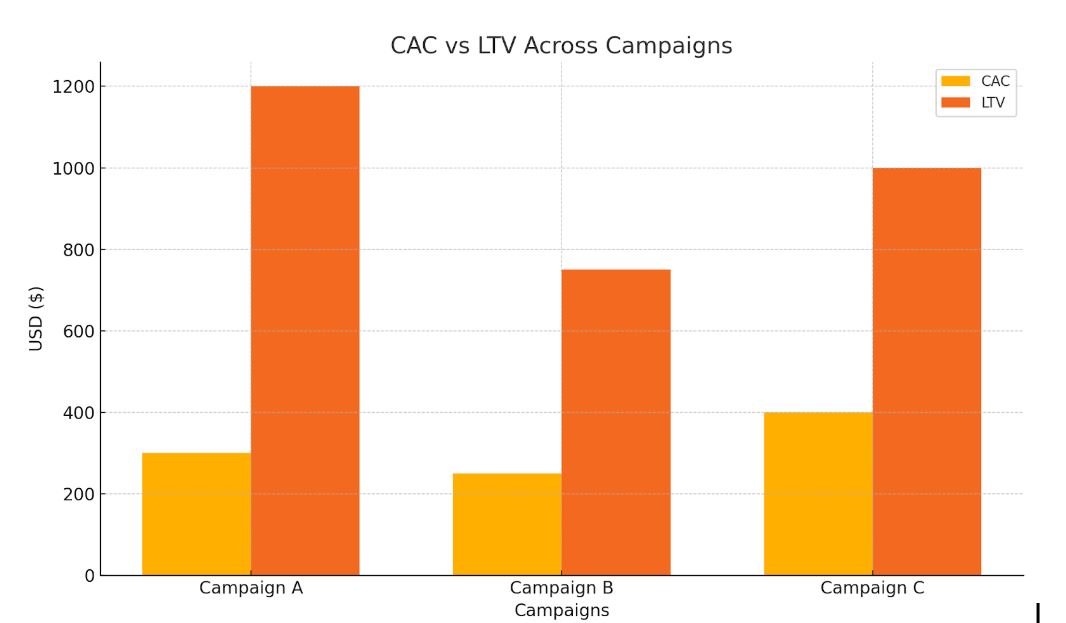
Here’s a chart comparing Customer Acquisition Cost (CAC) and Customer Lifetime Value (LTV) across three sample campaigns.
Retention & Engagement Metrics
- Trial-to-Paid Conversion Rate. If your Google ad drives free trial signups, this metric shows how many become paying users.
- Churn Rate. High churn from ad-acquired users may signal poor targeting or onboarding.
- Activation Rate. This metric indicates how many users perform a key action that signifies product value.
To track these metrics, you will want to have access to the following tools and platforms.
| Trial-to-Paid Conversion Rate | CRM, Mixpanel, Amplitude, Heap, or Segment |
| Churn Rate | ChartMogul, ProfitWell, Baremetrics, Stripe |
| Activation Rate | Mixpanel, Amplitude, Google Analytics, Segment |
Ad Channel Efficiency Metrics
- Impression Share. This metric measures how often your SaaS ads are shown compared to how often they could be.
- Quality Score. Learn how Google rates your ad relevance, landing page, and CTR, which impacts CPC and ad rank.
- Return on Ad Spend (ROAS). In SaaS, ROAS can be hard due to recurring revenue, but helpful when tied to LTV.
To track these metrics, you will want to have access to the following tools and platforms.
| Impression Share, ROAS, Quality Score | Google Ads dashboard |
| ROAS (Return on Ad Spend) | Google Ads, Offline Conversion Tracking, Google Analytics ecommerce |
Crafting the Right Google Ads Strategy for SaaS
Google Display Network comprises over 2 million websites, videos, and apps where businesses can place ads. If you want to scale efficiently without wasting your budget, you should craft your Google ad campaign right from the start. The basis for your Google Ads is the keywords. Without utilizing the right keywords, your Google Ad campaign will not be efficient. You could spend thousands of dollars on your ads, but ignoring the relevance of keywords will result in poor ad performance.
If you’re new to keyword optimization, don’t worry. There is an approach you can use to ensure you’re targeting the right keywords. After you’ve extracted the keyword list from an SEO tool you use, you will see hundreds or thousands of results. This can make it difficult to immediately understand which keywords should be used for your B2B Google Ad campaign. Use Google Keyword Planner to find relevant keywords and key phrases.
Focus On Bottom-of-Funnel (BOFU) Keywords
That’s where Bottom-of-Funnel (BOFU) keywords come in. BOFU keywords refer to search words or phrases your potential customers use with the intent to purchase. Unlike Top-of-Funnel (TOFU) keywords, BOFU targets the target audience close to making a purchase or with a specific set of needs.
As a B2B SaaS company looking to make the most of your B2B Google Ad campaign, you will want to focus on high-intent keywords such as:
- “best [SaaS category] for [use case]”
- “[competitor name] alternative”
- “buy [product type] software”
- “[software type] software”
- “[product name] free trial”
- “[product name] pricing”
- “[product 1] vs. [product 2]”
The more specific your keywords are, the better the campaign performance. Avoid generic, broad, and informational keywords. They will drain your Google Ads budget fast without any efficient results.
Build Keyword Groups
Your first ad idea might be to explain your product features. As much as you are expected to introduce your product well, it will only get you in front of users who know your product. Instead, you will want to group your keywords by categories that allow you to broaden your Google ad reach.
Instead of only product features, group keywords by:
- Pain points. Determine your target audience’s main pain points and address them using high-volume search keywords.
- Industries. If your B2B SaaS product targets a specific industry, highlight it in the keywords you use for your B2B Google ad.
- Roles. If your product is being used by a specific role, include that in your Google Ads keywords.
By doing so, you will improve your ad relevance and Quality Score. By organizing your keywords, you will maximize them while designing your high-converting landing page. By skipping these steps, your Google ads campaign will not be as efficient as you need it to be.
Leveraging Smart Bidding Strategies
To maximize any Google ad, you must learn to use Smart Bidding strategies first. The first trap most businesses fall into when creating their first B2B Google Ad is immediately starting with Smart Bidding. Smart Bidding needs data to work efficiently.
Instead, Start with Manual CPC or Enhanced CPC. With Manual CPC, you can set the maximum price you’ll pay for each click. Enhanced CPC (ECPC) automatically adjusts your manual bids to increase conversion chances. ECPC is a form of Smart Bidding that helps you get more conversions by adjusting your bids based on the likelihood of a click leading to a conversion.
When you have around 50 conversions in the past 30 days, consider switching to Smart Bidding for maximum impact. There are different types of strategies you can opt for, depending on your campaign goal.
| Goal | Smart Bidding Strategy |
| Maximize signups or leads | Maximize Conversions or Target CPA (tCPA) |
| Maximize revenue | Maximize Conversion Value or Target ROAS (tROAS) |
| Warm traffic retargeting | Maximize Conversions |
| Brand or early funnel visibility | Maximize Clicks |
Regardless of the Smart Bidding strategy, you will want to use Google Ads Experiments for testing. Running split tests between a manual and a Smart Bidding strategy will provide you with valuable insights. This data can then be used to optimize your B2B Google Ad campaign.
Additional tip from Google Ads experts:
Separate your high-intent (BOFU) campaigns from low-intent (TOFU) keywords to ensure consistent conversion behavior. A Smart Bidding campaign works best when it shows a stable pattern of behavior.
Audience Targeting: Reaching the Right Users
It’s not a secret that reaching the right audience with your Google Ads is crucial for your campaign’s success. This is especially true when dealing with long sales cycles or niche B2B segments.
The more precise your targeting is, the higher the chances are of converting your potential customers.
1. Start With High-Intent Custom Segments
Custom segments are the most powerful targeting tool in Google Ads for SaaS businesses. This tool allows you to build segments based on certain characteristics, such as specific competitor keywords, industry-specific pain points, and job titles.
The same approach can be used for your Display, Discovery, YouTube, and LinkedIn ads to reach users searching for SaaS solutions across different platforms. Here is where the keyword groups mentioned above come in handy.
2. Use Detailed Demographics
Now that you’ve decided on your Custom Segments, you will want to target them further by adding detailed demographic details. Knowing your target audience well can help you craft a better Google Ads campaign.
The information you can add to your Google Ads campaign is the following:
- Company size
- Education level
- Parental status
The same information can also be used for your B2B LinkedIn ads, where many of your prospective customers are. Engaging your audience across different platforms increases your chances of gaining new customers.
Combine detailed demographics with keyword targeting to narrow your search to B2B buyers more precisely. Remember to be as specific as possible when targeting your audience. Opting for broader audiences will drain your Google Ads budget too quickly and without any results.
3. Leverage LinkedIn-Like Intent Using In-Market + Affinity Audiences
We’ve mentioned LinkedIn ads before. By applying a similar approach, use In-Market and Affinity Audiences to target your users better. You can target users “in-market” for SaaS company services, productivity software, or cloud platforms.
You will want to then combine them with Affinity audiences like startup founders, business professionals, and cloud developers.
Additional tip from Google Ads experts:
Ensure you layer audiences as “observation only” in Search campaigns to assess performance before narrowing.
4. Segment Your Retargeting Lists by Funnel Stage
What works for one SaaS company might not work for another. The way yo do remarketing shouldn’t be a copy-and-paste from your competitors. The purpose of remarketing is to reassure people who interacted with your brand or product to give it another chance.
To make your remarketing successful, you’ll have to identify why you want to retarget them. Did you want them to sign up, but they haven’t? Did you want them to sign up for a free trial, but they haven’t?
If you segment your retargeting lists by funnel stage, your ads will be more successful. Think of it like this:
- Site visitors (no signup): Push “free trial” or “demo”
- Trial users (no activation): Push “feature-focused” messaging
- Activated users (no payment): Highlight benefits of paid plans
- Use email list uploads to retarget leads from HubSpot or Salesforce
You can even segment your retargeting lists by actions like pricing page visit, free trial signup, or blog read.
5. Create Lookalike Audiences from High-LTV Users
This step is what will differentiate you from all those other SaaS businesses that are not using the services of a trusted Google Ads agency. Even if you’re not working with a Google Ads agency, we’ll tell you how to create Lookalike Audiences from High Customer Lifetime Value (LTV) users.
You will want to upload a list of your best customers through Customer Match. Once your list is uploaded, instruct Google to create “Similar to” audiences for new targeting. Ensure you exclude free users or churned accounts from this list to avoid low-quality lookalikes. Simple as that!
6. Use Combined Audiences
This is where Google Ads allows SaaS businesses to become creative with their strategy. Going beyond simple demographic details will connect you with prospects ready to convert. You can combine different conditions to convert better.
For example, you can combine the following conditions:
- 1) In-market for project management software, and 2) Visited competitor website
- 2) Affinity: Business decision-makers, and 2) Searched for CRM software
Optimizing Google Ad Copy and Extensions
Optimizing ad copy and extensions is one of the most effective ways to improve your SaaS Google Ads performance. Many SaaS businesses will overlook this because they have already launched their ad and are now focusing only on tracking results. However, optimization is crucial for success.
Optimization should be your next step if you want to boost your CTR, Quality Score, or conversion rates. The average click-through rate (CTR) in Google Ads across all industries is 6.42%.
When creating and optimizing your Google ad copy and extension, you should be aware that most users don’t read; they scan. In other words, they’ll simply ignore your Google Ad if you don’t catch their attention in less than two seconds.
Most SaaS businesses that perform successful Google Ads use the following formula:
[Pain Point] + [Benefit] + [CTA]
Be straightforward. Don’t use fancy vocabulary if your audience doesn’t use it. Write in the same way that your audience talks.
Other things to keep in mind when optimizing your Google Ad copy and extensions are:
- Highlight use cases over features. SaaS buyers don’t care about features until they see the outcome.
- Test 3 ad variants per ad group continuously. Always test one control ad, one challenger ad with a new angle, and one wildcard.
- Use social proof. Mention the number of your existing customers or percentages to stop people from scrolling.
- Use specific CTAs. Instead of using ‘Learn More’, consider action-driven CTAs like Book a Demo Now or Start Free Trial.
- Max out ad extensions. Extensions mean more screen space and more clicks. Use sitelink extensions, callout extensions, structured snippets, or lead form extensions.
Designing High-Converting Landing Pages
As a SaaS business, you’ll want to avoid high-converting tips for other industries. Your landing pages should be designed with the SaaS target audience in mind. The landing pages you build should go hand in hand with your CRO strategy.
You can create a landing page to achieve a specific SaaS goal, such as free trials, signups, and demo bookings. Whatever it is, it should be designed to convert as many visitors as possible. To do so, you will need to pay attention to several factors.
Each landing page should have only one goal. If you aim to get more free trials and signups, your messaging might be confusing to visitors. As a result, they will simply leave the landing page and look for another solution. Don’t use multiple CTAs or include unrelated content or offers.
Make the most of your headline. It should immediately convey the problem it solves and how it matters to the user. Add subheadings to explain how you solve that problem. Don’t forget to show value throughout all content, including images and videos.
The structure your SaaS landing page should follow is:
- Above the Fold (First Screen)
-
- Headline
- Subheadline
- Primary CTA Button
- Hero Visual
- Trust Signal
- Key Benefits Section
-
- Benefit-driven headline
- Short description
- Visual icon or UI snippet
- How It Works / Product Features
-
- Step-by-step walkthrough
- UI screenshots or an animated demo
- Social Proof
-
-
- Customer quotes with name, role, and company
- Star ratings
- Logos of recognizable clients
-
- Pricing Snapshot
-
- Simplified pricing block
- Highlight value and what’s included
- CTA to view full pricing or start for free
- Final CTA
-
- Restate the value prop
- Repeat CTA button
- Trust badges or user count
A/B Testing and Continuous Google Ads Optimization
Your landing page and B2B Google Ads must be constantly tested and optimized to maximize your opportunities. Google Ads optimization can help your business improve conversion rates, lower CAC, and scale much quicker than simply leaving your ads as they are.
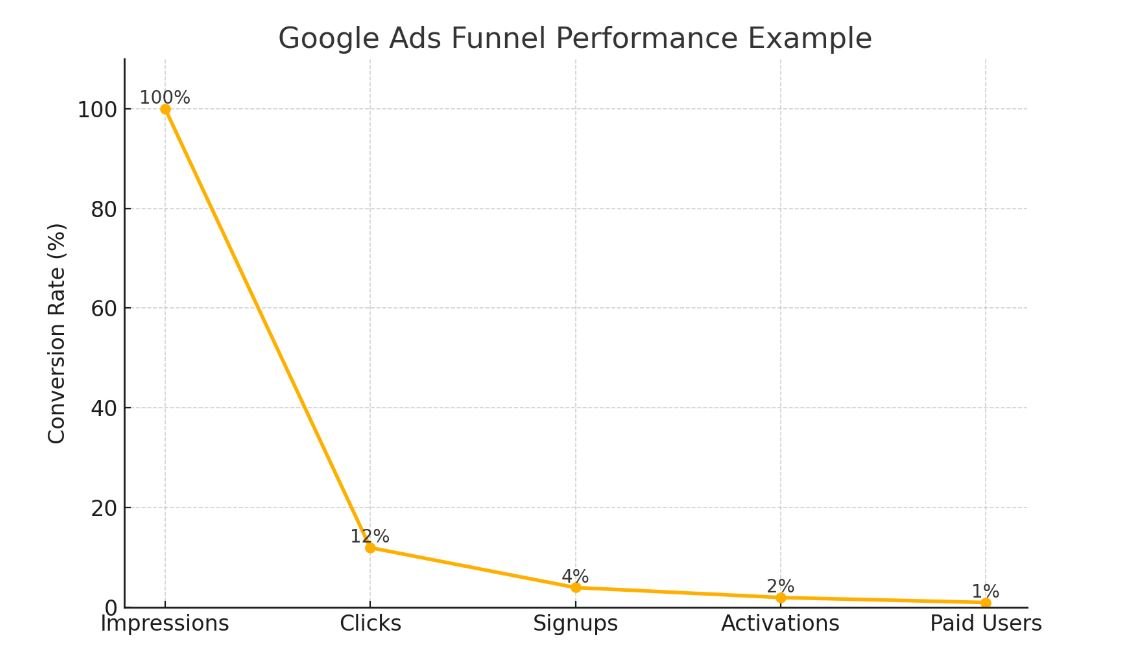
This chart shows a Google Ads funnel breakdown — from impressions to paid users — to visualize drop-off at each stage.
When talking about testing, most people will struggle to understand which parts of ads need to be tested. You don’t have to test every detail of your Google ad. Focus your A/B tests on high-impact variables first.
Once you have your SaaS Google Ad up and running, you should think about testing the following elements:
- Headlines
- Call-to-actions (CTA copy, position, and color)
- Offer type (“Free Trial” vs “Demo” vs “Freemium”)
- Ad creative (especially for YouTube ads & Display ads)
- Audience targeting or intent layers
Google Campaign Experiments can help you split traffic scientifically and preserve data clarity. You can create campaign experiments from your original Google Ad and then split traffic 50/50. For your other tests, you can consider 70/30. Ensure you test bidding strategies, audience combinations, or copy variants.
This will help you see which of your ad elements work better and avoid dilution of ad history or keyword cannibalization. Consider using tools like CXL’s A/B test calculator, Google Optimize, or VWO, and GA4 event goals for conversion validation.
Common Mistakes to Avoid in SaaS Google Ads
SaaS Google Ads can play a significant role in your overall digital marketing strategy if you optimize them well. Even those experienced in Google Ads management can make mistakes that can cost businesses thousands of dollars. To avoid this from happening to you, we’ve talked to a leading Google Ads specialist to hear which mistakes are quite common when creating and optimizing Google Ads.
1. Run 1 Controlled Test at a Time per Funnel Stage
Do your best to avoid overlapping tests that create messy data. An example of such a mistake can be doing an A/B test ad copy in Google Ads, but pausing the landing page tests during that period. Another example is testing your landing page offer but keeping your ad content identical. To ensure maximum clarity, isolate variables or you’ll never be certain which element of your SaaS ads works well and why.
2. Not Aligning Ads With User Intent
Not being aware of where your users are in the funnel will make your Google ads inefficient. Your keywords, copy, and everything else should address their funnel stage. That also means if you want to target different funnel stages, you should create an ad for each stage.
3. Sending Traffic to the Homepage
For a page to be highly converting, it should be straightforward and address only one goal. Your homepage is not a focused landing page. This implies that a homepage will distract your users and not guide them towards your desired action.
4. Ignoring Negative Keywords
Negative keywords prevent your ads from appearing when someone searches for them. That way, your ads will not be shown to users who are unlikely to be interested in your product or service. This will result in saving money and improving ad relevance. Focus on building and expanding your negative keyword list to ensure you don’t waste your budget on irrelevant clicks.
5. Ignoring Quality Score
If you have a low Quality Score, it will raise your cost-per-click and destroy ad visibility. To fix that, you will want to improve your ad relevance, landing page experience, and expected CTR. By ignoring Quality Score, your ads will be doomed to fail.
Scaling Success with Google Ads
After you’ve created your Google Ads account, you will be able to maximize the potential of SaaS PPC. Google search ads allow you to reach your next potential customer at the right moment. Google Ads marketing can improve your brand awareness without the need to hire an expensive SaaS PPC agency.
Once you have your Google Ads account set up, focus on gathering a keyword list and grouping it into relevant categories. Every search term should be organized in an appropriate group to allow you better ad targeting.
If you follow the tips from this guide, you will become a Google Ads expert. The great thing about this entire process is that the data you’ve gathered can be used for content marketing as well.
If you still feel that SaaS PPC is too overwhelming for you or you want someone else to manage your Google Ads account, reach out to us. In Algocentric Digital Consultancy, we know how to get your SaaS product in front of the right audience. We treat each SaaS business uniquely, which allows us to achieve your SaaS business goals with more ease.


Sergiy Solonenko is the founder of Algocentric Digital Consultancy, a seasoned digital strategist, and a fractional CMO for B2B SaaS brands undergoing digital transformation. With over a decade of experience, he specializes in scaling demand-generation programs, optimizing account-based marketing, and aligning sales and marketing teams. Sergiy helps B2B SaaS companies enhance lead qualification, improve user experience through personalization, and leverage Martech to accelerate MRR growth.