The SaaS landscape is unique and full of specific obstacles and opportunities. Many B2B SaaS businesses are still trying to figure out how their strategy can address this and lead them to success. Among numerous SaaS marketing strategies, they opt for SaaS Google Ads to achieve business growth and build brand awareness.
However, Google Ads are not as straightforward in the SaaS sector as they might be in others. This is where most Google Ads mistakes start happening, and the performances of these businesses start declining because of poor ad management and a lack of understanding in general.
Knowing that 63.41% of all Internet traffic is a referral from Google, we’ve decided to gather common SaaS Google Ads mistakes companies make with suggestions on how to fix them. Even if your B2B Google Ad is performing efficiently, be sure to go through this list to have an idea of what you’ll want to avoid with your Google Ads campaigns.
Targeting Low-Intent Keywords over High-Intent Ones
There’s no doubt that you already know that keywords should be the backbone of your Google Ads strategy. However, not every keyword will produce the desired results. Some keywords have low search volume, while others have high search volume. Search volume indicates how popular a certain keyword or phrase is among your target audience. Determining which keyword to use based on search volume is quite easy, but what happens with intent?
High search volume doesn’t imply a high-intent keyword. In other words, just because a keyword has a high search volume doesn’t mean the user has a high intent. Looking into keywords based on the user intent refers to the user’s readiness to take a specific action. High intent indicates that the user is further down the sales funnel and more likely to convert.
If you’re also going after high search keywords and ignoring the intent of these searches, you should switch your focus to high-intent keywords. To be able to do that, you will first need to understand the three different types of user intent:
- Informational: What is project management software?
- Navigational: Product pricing
- Transactional/Commercial (High Intent): Buy project management software, Best CRM for small business
When you’ve determined the intent type of your keyword, you should dig a bit deeper. Look for the following high-intent keywords:
- Action verbs: buy, get, start, try, download
- Modifiers: best, top, cheapest, most reliable
- Comparisons: vs, alternative, compare
- Urgency: now, today, free trial
Go after long-tail keywords as they generate a 3-6% better CTR. Make the most of Google Keyword Planner and check the Top of page bid. You will want to look for the highest bids because they often indicate high commercial intent. If you use any paid tool, such as SEMRush or Ahrefs, you can also see which keywords are converting and bringing in traffic. If this seems overwhelming to you, it would make sense to hire an agency that offers SaaS Google Ads services.
Not Segmenting Campaigns by Intent or Category
Being all over the place is not the right attitude for Google Ads. Don’t forget that Google loves order and structure, so the same goes for Google Ads. Not segmenting campaigns by intent or category is one of the most common and expensive Google Ads mistakes SaaS companies make. This also goes for all ad formats you decide to use: Search ads, YouTube ads, Bing ads, etc.
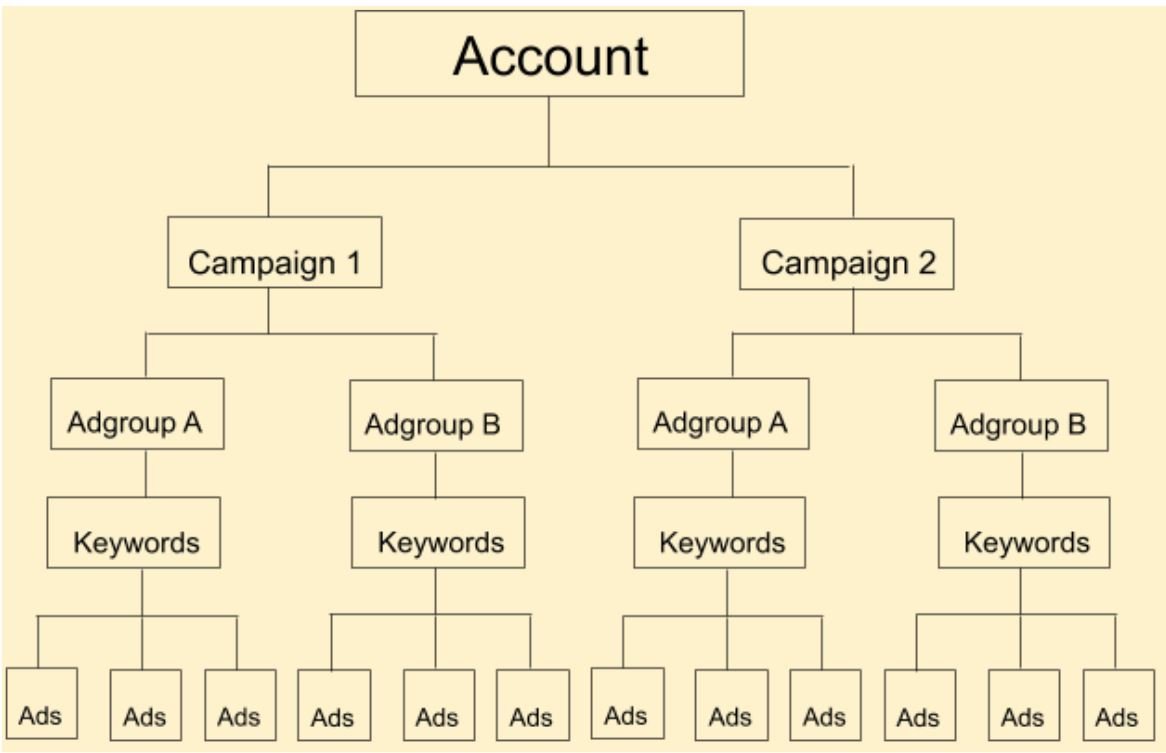
Many SaaS advertisers will gather all their keywords into a single campaign or ad group, regardless of the user intent, type of feature, or industry. Displaying your Google Ad in front of someone looking for different information about your business or product is a waste of money. If a user is looking to learn about your product, offering them to buy the product could actually reject them completely from your B2B SaaS company.
When you segment your Google Ads campaign properly, you will notice a higher CTR, pay less per click, and increase conversion rates. By doing this, you can also bid more aggressively on high-intent keywords and pull back on research-stage terms.
The best ways to segment your Google Ads campaigns look like this:
| Funnel Stage | Intent | Example |
| Top of the Funnel (TOFU) | Informational searches | What is sales CRM? |
| Middle of Funnel (MOFU) | Comparison/searching for options | Best CRM for SaaS startups |
| Bottom of Funnel (BOFU) | High purchase intent | CRM software with free trial |
Make sure you set up separate campaigns or ad groups for each. Tailor ad copy and landing pages accordingly. Don’t forget that 54% of users want to see content that is personalized to their interests. Your content marketing efforts should be closely tied to your ad campaign.
If it makes sense, you can also segment your campaigns by product features, use cases, and industries. When creating Google Ads for different industries, ensure you’re adding the industry in the copy, with other elements that will resonate with that industry.
Expert tip:
Use single keyword ad groups (SKAGs) or tighter ad group themes for BOFU keywords.
Neglecting Negative Keywords and Match Type Control
Sometimes, SaaS companies will be so focused on what they want to rank for that they’ll completely ignore the power of negative keywords. When you don’t have a list of negative keywords, also known as keywords you don’t want to rank for, you will waste your ad budget on irrelevant clicks.
When paired together, neglecting negative keywords and match type control is one of the most common and damaging mistakes SaaS companies make with Google Ads. It leads to wasted spend, irrelevant traffic, and poor ROI.
As much as it would be perfect, Google doesn’t always match your Google Ads with relevant searches. You have to ensure your Google ad is not shown to a user who will not take the desired action. Not only are you paying for clicks that never convert, but you are also wasting ad spend, declining your conversion rates, and causing poor quality scores.
You will need to use negative words continuously to avoid this Google Ads mistake. Here is a list of negative keywords that can be useful to a SaaS business:
- Free (if you don’t offer a free product)
- Jobs, Career, Review (if you don’t want people looking for employment or generic reviews)
- Training, Course (if you’re not offering education)
- Competitor brand names (unless you’re specifically bidding on them)
To get an idea of which keywords should be on this list, make sure you regularly check your search terms report.
You can use three types of matches for your keywords: broad, phrase, and exact. Ensure you start with Phrase Match and Exact Match for your high-intent terms. Then, use Broad Match only with strong conversion tracking and tight negative keyword lists.
Expert tip:
Create a shared negative keyword list in Google Ads that you can apply across multiple campaigns, such as excluding job seekers, students and irrelevant industries.
Sending Traffic to Generic Homepages
The entire Google Ads pathway should be as tailored to your target audience as possible. You want to tailor your Google Ads copy, but you’ll also want to tailor the content you offer to your potential customers after clicking on your ad. That is where segmenting your ads can provide you with valuable tips on how to create and what to add to your landing page.
If you decide to send your potential customer to your homepage, they will not be encouraged to take a specific action. Instead, they’ll feel confused and have to look for the information they need all over your website. The great thing about Google ad strategy is that it allows you to accompany your target audience from the first to the last step of their journey.
Just think of all the different information that can be found on your homepage. Most importantly, it’s probably not conversion-friendly, so you’ll lose all these visits after they land on your website.
Create campaign-specific landing pages that match the intent of the search term and the promise in your ad copy. For instance, if your Google ad targets the keyword “CRM software for small teams”, the landing page should clearly speak to small teams, their challenges, and how your CRM solves them.
Make sure your call-to-action buttons are simple, visible, and engaging. Whatever CTA you opt for, it should invite the visitor to take a certain action (e.g., Book a demo, Start free trial). Message matching is very important for the success of your Google ads. Use consistent language, offers, features, and pain points to convey the message efficiently and convert your audience.
Get a copy in your Email
Poor Conversion Tracking and Lead Qualification
Poor conversion tracking and lead qualification are one of the most common and most damaging mistakes SaaS businesses make with Google Ads. It leads to misleading performance data, wasted budget, and a false sense of success.
Many SaaS companies will often track every click or form submission as a conversion. However, not every lead is a qualified lead. If you want to be good at online ads and all related strategies you build around it, you will need to learn the difference between MQLs, SQLs, trials, demos, or paid signups. Each of these leads has specific characteristics, and mixing them together into one group will take a toll on your ad performance.
When you treat all your leads the same, it means you’re actually optimizing for vanity metrics instead of revenue. You’re also scaling campaigns that generate low-intent or zero-value leads.
To avoid making poor bidding and budgeting decisions, you will want to pause for a moment and start defining meaningful conversions. Start tracking conversions that reflect real value for your SaaS business, such as:
- Product demo booked
- Free trial started
- Account created with activation
- Marketing Qualified Lead (MQL)
- Sales Qualified Lead (SQL)
- Paying customer
Use tools like Google Tag Manager, event-based tracking, and custom events in Google Ads or Google Analytics to get valuable insights on these conversions. If you want to take it one step further, you should set up value-based tracking. This means that you would assign value to each of the desired actions. It could look like this:
- Free trial: $10
- Demo: $200
- SQL: $400
- Paid user: $800
Integrate Google Ads with CRM or backend tools such as Salesforce, Segment, Zapier, and Hubspot. This lets you track which campaigns actually result in paying customers, allowing you to backtrack performance to the ad click level.
Expert tip:
Feed real revenue or CRM-qualified lead data back into Google Ads. This allows the algorithm to prioritize leads that actually close.
Ignoring Audience Targeting and Retargeting
Google Ads, previously known as Google AdWords, is a powerful tool for SaaS businesses because it allows audience targeting and retargeting. Not making the most of it will cost any B2B SaaS company money and time.
Many SaaS companies focus only on keywords and forget about audiences. Knowing your audience means you’re able to segment them by their key characteristics and add them to an appropriate funnel stage. Ignoring the lifecycle stage of your potential customers is another common mistake when SaaS businesses craft and optimize their Google Ads strategy.
Audience targeting and retargeting allow you to engage and re-engage your potential customers until you convert them. Audience targeting helps you move leads through the funnel and tailor messages to where someone is in the decision process.
To maximize its potential, start layering audience targeting in search campaigns. Add audience layers to keyword targeting so you can adjust bids or messaging based on company size, job title or role, industry, and past website behavior. This type of information can also be used for LinkedIn ads, which can align nicely with your Google Ads and a dedicated landing page.
When it comes to retargeting, RLSA and Display or YouTube Retargeting are considered high-ROI for SaaS businesses. Remarketing Lists for Search Ads (RLSA) show tailored Google search ads to people who’ve already visited your site but didn’t convert. Display or YouTube retargeting nurtures leads with case studies, testimonials, feature highlights, or limited-time offers.
You can retarget different types of custom audiences, depending on your preferences. It can be users who visited your pricing page or users who started but didn’t finish the free trial signup.
While you’re targeting and retargeting your audience, why not create similar audiences for your Google Ads? Use Google Ads’ Customer Match to create lookalike audiences, which can then be leveraged with Display Ads, YouTube Ads, and Discovery Ads.
Overlooking Brand and Competitor Keywords
Many SaaS businesses decide not to bid on their own brand keywords or their competitors thinking it’s a waste of money. If you, too, think that there’s no need to bid on your own branded keywords because Google will show your website in the SERP, continue reading.
Protecting your brand on Google is crucial. You don’t want a potential customer to click on your competitor’s ad above your website and lose the opportunity to convert them. When you don’t bid on brand and competitor keywords, you lose high-intent traffic. In other words, you fail to influence buyers who were in their decision mode and hand them off to your competitors.
Keep in mind that branded keywords will typically have a lower CPC, yet very high quality score. This means that you will not have to spend a lot on such a Google Ads campaign, but you can expect positive results. When you bid on your own brand keywords, you protect your real estate, control the messaging, and monitor brand search volume trends over time.
Just think about it. Users who search by using a business name, whether yours or a competitor’s, are already aware of the solution your SaaS product provides. That means they are either in comparison or purchasing mode.
To bid on your own brand, you will want to do the following:
- Use sitelinks to promote key features or offers.
- Add structured snippets, such as automation, integrations, or dashboards.
- Monitor competitor encroachment to see if they’re bidding on your name.
To bid on your competitor’s branded keywords, you will want to do the following:
- Create dedicated landing pages where you compare your solutions with your competitors.
- Focus on your unique edge, such as price, support, niche fit, integrations, ease of use, etc.
- Avoid using competitor names in ad copy, but use indirect messaging like “Tired of [Problem X]?” or “A Better Alternative to [Tool Type]”.
Having all this in mind, remember that bidding on competitors’ keywords is allowed, but mentioning their name in the ad copy isn’t. To be on the safe side, always check Google’s ad policies and your local laws.
“Set and Forget” – Not Continuously Optimizing
Just because your campaign has been launched and you’ve set an end date, it doesn’t mean you should forget about it. The most successful Google Ad campaigns are the ones that have been optimized constantly for improvement.
Any SaaS PPC campaign, whether it’s a Facebook ad, Bing ads, or video ads, should be optimized constantly for success. Optimization is especially important in the SaaS sector because it’s a highly competitive landscape. Leaving your ads on autopilot will cost you hundreds, if not thousands, of dollars.
If you ignore optimization, you will most likely pay for irrelevant clicks, get low-quality leads, and bid on inefficient keywords. Did you know that 15% of daily Google searches use keywords never used before? This means you have to pay attention to everything if you want your ad campaign to work.
Google Ads gives you incredible data, from keyword-level conversions and audience insights to device performance and location breakdowns. Making the most of data is possible only if you review it regularly and test different hypotheses. Reviewing data will allow you to refine targeting, messaging, and bidding.
Google’s Smart Bidding and automation tools can improve results, but they will need clean conversion tracking, clear goals, and ongoing input. Here are the suggestions on how to implement optimization in your ongoing Google Ads strategy:
- Review search terms to refine negatives every week.
- Perform A/B testing of your ad copy and landing pages.
- Adjust bids by device, location, and time of day.
- Test new audiences or match types to see what works better.
- Monitor funnel drop-off and align messaging with lifecycle stages.
With an ongoing optimization, SaaS companies can spend smarter and scale customer acquisition predictably. With time, you will notice how the quality and intent of your leads is improving, leading to better ROAS and CAC-to-LTV ratio. After all, all you want is to achieve the maximum benefits of your Google Ads budget.
Conclusion
Running a profitable Google Ads account as a SaaS company takes more than just setting up campaigns. It requires strategy, precision, and constant refinement. From poorly structured campaigns to ignoring valuable search term data or underutilizing ad extensions, these mistakes create unnecessary friction in your funnel and lead to wasted ad spend.
Whether you’re targeting the search network with Google search ads or building awareness through the Google Display Network, each channel demands tailored messaging and audience segmentation. Neglecting foundational tactics like proper match type control, tracking high-intent actions in a Google Sheet, or testing automated bidding strategies can stall your entire digital marketing engine.
Remember to leverage every tool available, from ad extension optimization to strategic use of shopping campaigns. This is important if your SaaS offers physical products or integrations. You can turn Google Ads into a powerful growth channel by continuously analyzing data, refining your search terms, and aligning creative with audience intent.
If, after reading this, you’ve decided to hire an agency that offers SaaS Google Ads services, such as Algocentric Digital Consultancy. Our team of experts can craft a quality Google Ads strategy tailored to your business needs and optimize it for maximum success.
Frequently Asked Questions
What are the most common Google Ads mistakes SaaS companies make?
Common mistakes include targeting overly broad keywords, failing to track conversions properly, ignoring negative keywords, relying too heavily on automated bidding without oversight, and not aligning ad copy with landing page content.
Why are my Google Ads getting clicks but no conversions?
This often happens due to poor landing page experience, misaligned messaging, or attracting the wrong audience. Reviewing keyword intent and improving landing page UX and offer relevance can significantly boost conversions.
How to know if your SaaS Google Ads budget is being wasted?
Signs include high bounce rates, low Quality Scores, irrelevant search terms, or high Customer Acquisition Costs (CAC). Regular audits and using tools like Search Terms Report and conversion tracking can help you pinpoint waste.
How to fix low-performing Google Ads for a SaaS product?
Start by tightening keyword targeting, rewriting ad copy to match user intent, improving landing pages, and testing new offers or calls-to-action. Implement A/B testing and monitor campaign metrics weekly.
Should I use Performance Max or Search campaigns for my SaaS product?
Performance Max can be powerful, but it works best when paired with strong creative assets and clear conversion goals. Search campaigns are often more effective for targeting high-intent SaaS buyers, especially in B2B.


Sergey Solonenko is the founder of Algocentric Digital Consultancy, an active digital strategist and a fractional CMO for many B2B SaaS brands embracing digital transformation. At Algocentric Digital Sergey’s focus is on empowering every B2B SaaS brand who is looking to scale their demand generation program. Sergey’s digital marketing experience over the last 10 years has allowed him to become a digital evangelist focused on improving B2B SaaS demand generation programs and consulting on best practices around account based marketing, sales and marketing team alignment, setting up better lead qualification systems and improving user experience through personalization by aligning martech with key marketing KPIs that ladder up to faster MRR for B2B SaaS brands.